![[logo] DiagNation Combo Responsive](https://diagnation.com/wp-content/uploads/logoDiagNationTM_Combo.svg)
Network faults are the quickest way to lose a day. One minute, the car is “just in for a warning light,” and the next, you’ve got U-codes everywhere, modules dropping offline, and a bay that can’t move until communication comes back.
The good news: you don’t have to treat network problems like black magic. If you follow a repeatable process, you can troubleshoot CAN, LIN, and FlexRay network problems without guessing, without parts roulette, and without turning a simple comm issue into a module pile.
Why this matters to your shop
Network issues don’t just create diagnostic headaches. They hit the areas that matter most:
- Workflow: One “no-comm” car can lock up a bay and slow the entire schedule.
- Comebacks: A network issue that’s “mostly fixed” loves to return when heat, vibration, or moisture shows up.
- Trust: If the fix isn’t clearly explained, customers hear “we’re not sure,” even when you’re doing solid work.
- Profit: The longer you chase the problem, the more the job shifts from repair to unpaid detective work.
If you want more real-world case-style reading like this, browse the Web Log for additional shop-focused topics and diagnostic thinking.
What usually causes the issue (and what it does NOT)
Most network faults come down to a small set of repeat offenders. Your job is to identify which one is happening on this vehicle.
What usually causes network problems
- Power or ground issues to one module (or a shared splice) that ripple across the network.
- Harness damage near doors, trunk lids, under seats, or engine bay rub points.
- Water intrusion into connectors, modules, or junction blocks.
- Poor terminal fit (spread pins, backed-out terminals, corrosion that looks “fine” until loaded).
- A single module pulling the bus down (internal short, failed transceiver, or wake-up circuit stuck).
- Recent work side effects (aftermarket accessories, collision repair, audio installs, module replacement, battery service).
What it usually is NOT (common traps)
- Not automatically a “bad PCM.” Don’t start by blaming the most expensive module.
- Not fixed by clearing codes. Clearing data can erase the clues you needed to solve it.
- Not a great candidate for “swap and see.” Network faults punish guessing.
- Not always the module that sets the code. The reporting module might be healthy and just complaining.
A quick mindset shift helps: the network is a shared conversation. When one participant is noisy, silent, or short-tempered, everyone else reacts.
A repeatable test plan (step-by-step)
Use this same path every time. It keeps you from bouncing between tools and making assumptions.
- Verify the complaint and document the symptoms
What exactly is happening: no-start, warning lights, intermittent loss of functions, no scan communication, or specific modules offline? Write it down. You’re building a timeline you can trust. - Full vehicle scan, then save the evidence
Pull all codes from all modules. Save screenshots or a report. Note which modules are “no communication,” which networks are implicated, and any voltage-related or wake-up-related codes. Don’t clear anything yet. - Use the topology and wiring diagram to pick the right network first
Many vehicles have multiple networks and gateways. Decide whether you’re chasing a high-speed backbone, a local sub-network, or a gateway issue. This is where you decide whether you’re mainly dealing with CAN behavior, a LIN branch problem, or something that looks gateway-related. - Confirm power and ground to the “missing” modules
If a module is offline, don’t jump straight to “network failure.” Prove it has power, ground, and proper wake-up. A dead module can look like a network issue from the scan tool. - Check the “simple physicals” before the deep dive
Look for signs of water, pin fit issues, recent harness movement, and aftermarket splices. This sounds basic, but it is where a lot of network time is saved. - Measure network health in a controlled way
For CAN networks, resistance and continuity checks can quickly reveal an open, short, or missing termination. For LIN, confirm the line is behaving like a single-wire, master-controlled network. For FlexRay, rely on OEM test procedures and known-good comparisons. The key is not the number; it’s whether the network behaves consistently with the system design. - Isolate the segment without “unplugging everything.”
Isolation should be strategic. Start with the most likely offenders: recent-work areas, water zones, and modules on the affected branch. If disconnecting a module “brings the network back,” you still have to prove whether the module is faulty or the connector/harness to it is the actual issue. - Scope the network and interpret the pattern before replacing anything
This is where you confirm signal integrity and noise. You’re looking for clean transitions, stable biasing, and repeatable behavior. A distorted network waveform points you toward the right category of fault: short to power/ground, reflection from an open, a noisy module, or a power/ground quality issue. - Prove the fix under the same conditions that caused the failure
If it was heat-related, duplicate heat. If it happened on bumps, do a controlled road test. Re-scan, confirm all modules communicate, and verify the original symptom is gone.
That’s the core process to troubleshoot CAN, LIN, and FlexRay network problems without jumping steps.
Tools and data that make this faster
You don’t need every gadget on the planet, but you do need the right mix of information and measurement.
Data you should have open while diagnosing
- Factory wiring diagrams (including splices, grounds, and gateway layouts)
- Network topology view (if your scan tool supports it)
- DTC definitions that include setting conditions
- Service info for connector views and pinouts
Tools that speed up network diagnostics
- A scan tool that can show module presence and network status
- DVOM with good leads and back-probing capability
- Terminal tools for pin-fit checks and repairs
- A lab scope (a PicoScope is a popular choice for this kind of work) for signal integrity checks
- A breakout box or safe access method so you can test without damaging terminals
- Battery support equipment, especially when diagnostics lead into programming
A quick note on scoping strategy
When you scope, avoid “random probing.” Pick test points that represent the network segment you’re investigating (gateway side vs branch side). Capture before-and-after patterns when you isolate modules. The goal is to create certainty, not just collect pretty signals.
When to bring in support (so you don’t burn the day)
Network issues are exactly where support can save time, but only if you call early, not after you’ve tried five guesses.
Bring in support when:
- The network comes and goes intermittently
- Multiple modules are offline, and you’re not sure if it’s power, gateway, or bus integrity
- You suspect a module is pulling the network down but want to confirm before replacement
- You’re moving toward programming and want the plan locked in
Before you start a support session, gather:
- VIN, year/make/model, and symptom description
- Full scan report (saved, not cleared)
- Which modules are missing and on which network
- What you’ve checked already (power/ground results, resistance checks, isolation results)
- Any relevant scope captures, if available
- Recent repairs or events (battery replacement, collision work, water intrusion, accessory installs)
This is how you troubleshoot CAN, LIN, and FlexRay network problems efficiently: you control the process and you bring help in while the evidence is still intact.
How training makes this easier next time
Network diagnostics gets easier when your team stops treating it as “special-case work” and starts treating it as a normal system with rules.
The biggest wins come from:
- Understanding how networks wake up, sleep, and report faults
- Learning what “normal” looks like on good vehicles
- Practicing isolation logic so you don’t unplug the whole car
- Building confidence with scope use and connector handling
If you want structured learning that connects the theory to real shop cases, plug into theory-based automotive training so the next network car feels like a process, not a gamble.
Frequently Asked Questions
What’s the fastest first check when multiple modules show “no communication”?
Start with a full scan and identify exactly which modules are missing, then confirm power and ground to one missing module. A “dead module” can imitate a network failure.
Should I clear codes to see what comes back?
Not at the beginning. Save a scan report first. Clearing early can erase freeze-frame and context that tells you how and when the fault occurred.
If unplugging one module restores communication, does that prove the module is bad?
It proves that the module or its circuit is involved. You still need to confirm whether the module is internally shorted or if the connector/harness to it is damaged.
Why are intermittent network faults so time-consuming?
Because the bus may look normal when the fault isn’t active. Your job is to reproduce conditions and capture evidence while the failure is happening.
When does a network issue turn into a programming problem?
Often, after a module replacement or when a gateway/module update is required to restore proper communication. Battery support and a clear plan matter before you begin.
Next step
Option A: START a Session
If a bay is stuck or the fault is intermittent, start a live support session while the evidence is still on the car. The goal is to get a clean test plan and stop the guessing.
Option B: CREATE Repair Order
If you’re heading toward module replacement, setup, or programming/coding, create a repair order so the steps, requirements, and results stay organized.
Need help choosing the best path for your specific case? Reach out through Contact Us.
And if you want to level up your network workflow long-term, join training or a study group so the next one goes faster.

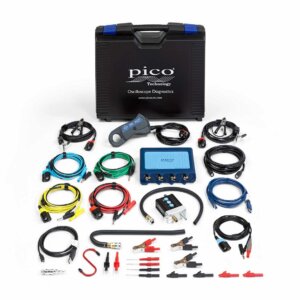 Pico PQ222 4425A Assessor's Kit
 ![[logo] Buttonology](https://diagnation.com/wp-content/uploads/imgButtonology-600x600-1-300x300.jpg) Buttonology
Buttonology